Google Cloud roadmap: GCP zero to hero in 10 stages
The fastest way to learn Google Cloud is in layers. Start with the account and the resource tree, then who can do what, then compute, storage and networking. Only then move to containers, data and AI. This Google Cloud roadmap puts those layers in order as 10 stages and 84 topics, each small enough to learn in an evening or two.
Most people start the other way round. They open the console, click on Kubernetes or Gemini because that's what job ads mention, and get stuck on a permission error or a firewall rule they don't understand. Others watch hours of videos and never build anything. By the end of this guide you'll know what to learn in what order and what to build at each stage without a big bill. You'll also know which exam each stage prepares you for.
How to use this Google Cloud roadmap
Think of Google Cloud as a city. Before you can open a shop, you need an address, a bank account, keys to the doors and roads to reach customers. The first five stages are that groundwork. The last five are the businesses you build on top of it.
Each stage below explains the one idea that matters most, names the topics in it, gives you one hands-on task, and ends with what exams test. The stages build on each other, so go in order the first time. Later you can jump to the topic you need.
The diagram below shows the 10 stages and where the two main Google Cloud certifications sit on the path.
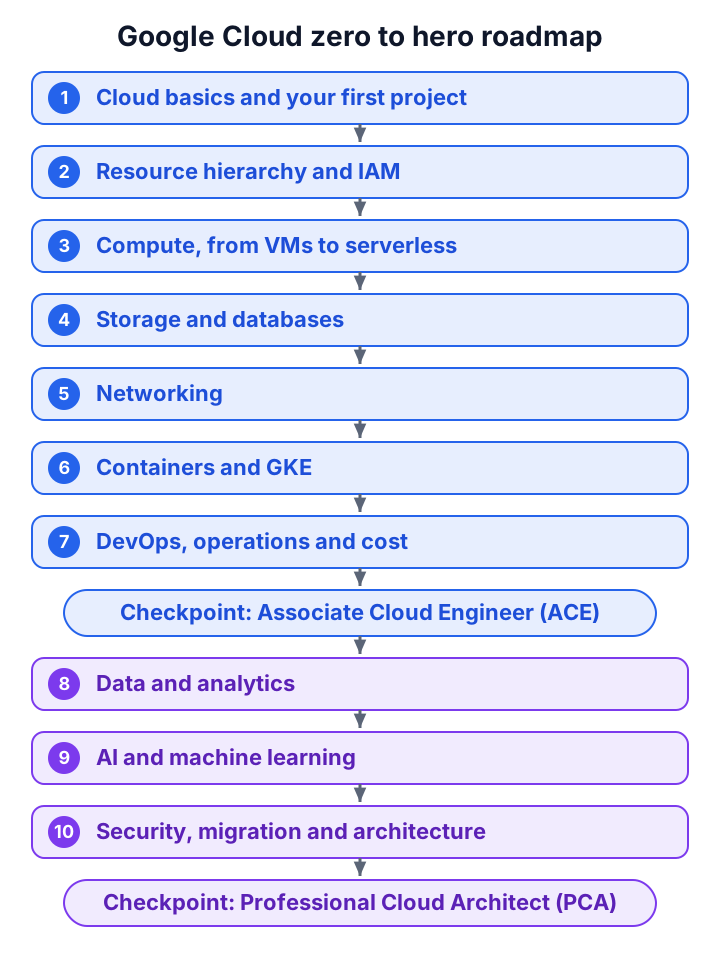
A sensible pace is one stage every one or two weeks, at 6-8 hours a week. That gets you through stages 1-7, the Associate Cloud Engineer (ACE) ground, in two to three months. Faster is possible if you already know Linux and basic networking. Slower is fine too: understanding beats speed.
Two habits make the whole roadmap easier:
- Build something at every stage. Reading about a firewall rule is not the same as finding out why your VM won't answer.
- Delete what you built. Clean up at the end of each session, so a forgotten VM doesn't eat your credit.
Stage 1: Cloud basics and your first project
Every cloud lets you rent computers, storage and networks instead of buying them. What differs is how much the provider runs for you. With infrastructure as a service (IaaS) you rent a virtual machine and manage everything on it. With platform as a service (PaaS) you hand over your code and the provider runs the servers. Serverless goes one step further: you pay only while your code runs, and nothing runs when nobody calls it.
Where Google Cloud runs
Google Cloud runs in regions (independent geographic areas, such as us-central1 in Iowa), and each region is split into zones (deployment areas inside a region, such as us-central1-a). Google's locations page lists 43 regions and 130 zones. A zone is your unit of failure: if you put two copies of an app in two zones of one region, losing one zone doesn't take you down.
The free trial and the free tier
You don't need to pay to learn most of this. Google Cloud has two separate free offers, and mixing them up is a common mistake:
- Free trial: $300 of credit for new customers, valid for 90 days. It ends when the credit runs out or the 90 days pass, whichever comes first. During the trial you can't add GPUs to VMs, request quota increases or create Windows Server VMs. For accounts that sign up on or after 16 November 2026, the credit also can't pay for Gemini Enterprise Agent Platform (formerly Vertex AI) services.
- Free tier: monthly limits that don't expire. You get one e2-micro VM a month in
us-west1,us-central1orus-east1, with 30 GB of standard persistent disk. You also get 5 GB of regional Cloud Storage in those US regions, 1 TiB of BigQuery queries and 2 million Cloud Run requests. Usage inside these limits doesn't touch your trial credit.
Projects, billing and APIs
Everything you create lives in a project, which is a container for resources, settings and the bill. A project has three names, and the exam likes to mix them up. The project ID is the unique name you choose at creation. The project number is assigned by Google and is read-only. The project name is a display label you can change any time.
Each project links to a billing account, which is who pays. A budget on that billing account sends alerts at thresholds you choose, such as 50%, 90% and 100%. Here's the myth: many beginners think a budget stops spending at 100%. It doesn't. A budget only alerts, so a runaway VM keeps running until you act.
Finally, most services are switched off in a new project. You enable the API for a service before you can use it, which is why your first gcloud command in a fresh project often fails.
Try it
Create a project, link it to the trial billing account and set a $10 budget with email alerts. Then open Cloud Shell (a free browser terminal with the gcloud command-line tool and 5 GB of persistent home disk) and run gcloud config list to see which project you're working in.
For the exam: know regions vs zones, the three project identifiers, and that budgets alert but never cap. A practice question on budget alerts tests exactly the last point.
Stage 2: The resource hierarchy and IAM
Picture a company with 300 projects. You can't grant access project by project; you'd never finish, and you'd never know who has what. Google Cloud solves this with a tree.
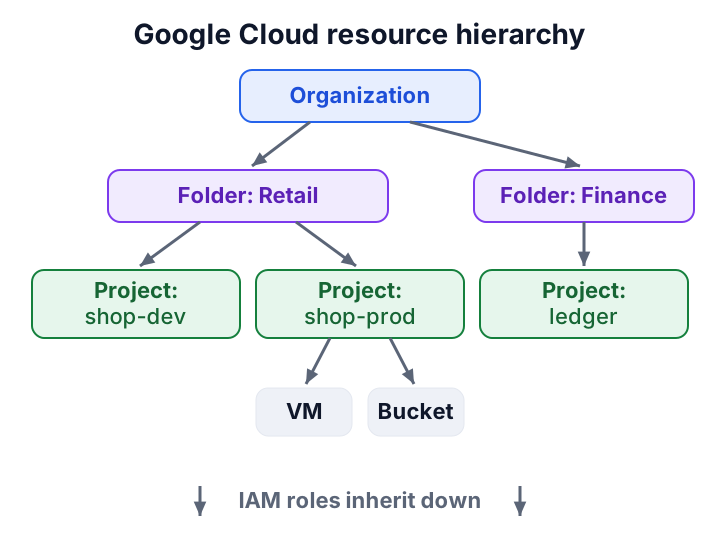
At the top is the organization (your company's root, tied to its domain). Under it sit optional folders (groups such as departments or environments), then projects, then the resources inside them. Every item has exactly one parent. The diagram below shows the tree and how access flows down it.
How access works
Identity and Access Management (IAM) answers one question: who can do what on which resource? The "who" is a principal, such as a user, a Google group or a service account. The "what" is a role, a bundle of permissions. You grant a role to a principal on a resource, and the grant flows down the tree. Grant a role on a folder, and every project in it inherits that grant, including projects created next month.
There are three kinds of roles:
- Basic roles: Owner, Editor and Viewer. Too broad for real work; avoid them outside a lab.
- Predefined roles: narrow roles Google maintains for each service, such as Compute Viewer.
- Custom roles: your own list of permissions, when no predefined role fits.
Service accounts
A service account is an identity for code, not for a person. A VM, a Cloud Run service or a pipeline uses one to call other Google services. The risk is the service account key, a JSON file that works like a password and never expires on its own. People leak these into Git repositories all the time.
The modern answer is to avoid keys entirely. Attach a service account to the VM or service that needs it. Let a person borrow a service account's rights for a short time through impersonation. For pipelines outside Google Cloud, such as GitHub Actions, use Workload Identity Federation, which swaps the pipeline's own token for a short-lived Google one.
Two guardrails sit above IAM. Organization policies restrict what can be created anywhere in the tree, such as "only in EU regions". Deny policies block a permission even when some role allows it.
Try it
Create a Google group, grant it Viewer on your project, then swap Viewer for a narrower predefined role. Then create a service account and attach it to a VM in stage 3 instead of creating a key.
For the exam: grant to groups, at the highest level that covers exactly the right projects, with the narrowest role. Try the practice question on role inheritance in a folder and the one on keyless deploys from GitHub Actions. Our guide to GCP IAM roles and service accounts goes deeper.
Stage 3: Compute, from VMs to serverless
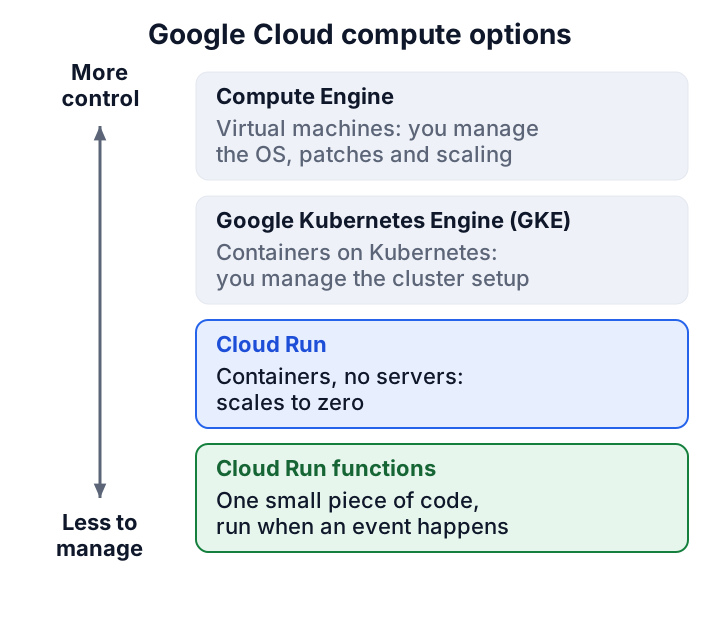
Google Cloud gives you at least five ways to run code, and choosing between them is the most common architecture question you'll meet. The trick is one scale: how much do you want to control, and how much do you want to manage?
Compute Engine
Compute Engine gives you virtual machines. You pick a machine type, a disk and an image (the operating system), and you own everything above the hardware: patches, updates, scaling. Use it for software that expects a normal server, such as a legacy app or a database you run yourself.
One VM is a pet: if it dies, you nurse it back. Production uses cattle instead. A managed instance group (MIG) runs many identical VMs from an instance template. It adds VMs when CPU climbs (autoscaling), replaces VMs that fail a health check (autohealing), and can roll out a new template gradually. A regional MIG spreads VMs across zones, so a zone outage doesn't stop the app.
Two ways to pay less are worth learning early. Spot VMs are much cheaper, but Google can stop them at any time, so they suit work that can resume, such as batch jobs that save checkpoints. Committed use discounts lower the price in return for promising steady use for one or three years.
App Engine, Cloud Run and functions
App Engine is Google's original platform as a service: you deploy code, it runs the servers. It still shows up in practice questions, for example on splitting traffic between versions.
Cloud Run is where most new apps should start. It runs a container (your app packed with everything it needs) without any servers for you to manage. A Cloud Run service answers HTTP requests and scales with traffic. When no requests arrive, it removes even the last instance, which is called scaling to zero. A Cloud Run job runs a task to completion, such as a nightly report, and then stops.
Cloud Run functions (once called Cloud Functions) run one small piece of code when an event happens, such as a file landing in a bucket. Think of them as a doorbell: nothing runs until someone presses it.
Say you run a small shop's order API. Traffic is busy at lunch and zero at 3 a.m. On a VM you pay for 24 hours a day. On Cloud Run you pay while requests are handled, and the free tier covers the first 2 million requests a month.
Try it
Create a free-tier e2-micro VM, SSH into it from the console and install a web server. Then deploy the same "hello" page to Cloud Run and compare how much setup each took.
For the exam: "no servers to manage, unpredictable traffic, pay only when used" points to Cloud Run, as in this practice question on scaling to zero. "Fault-tolerant batch, lowest cost" points to Spot VMs, as in the Spot VM batch question.
Stage 4: Storage and databases
Every app keeps data, but not all data is the same shape. Files, rows in tables, documents and time series each have a home that suits them, and the exam is full of "which store?" questions.
Cloud Storage
Cloud Storage keeps files, called objects, in buckets. It is the default place for images, backups, logs and data files. You pick a storage class by how often you'll read the data:
- Standard: data you read often. No minimum storage time.
- Nearline: read about once a month. Minimum 30 days.
- Coldline: read about once a quarter. Minimum 90 days.
- Archive: read less than once a year. Minimum 365 days.
The minimum is a billing rule, not a lock. If you delete an Archive object after 10 days, you still pay for 365. Colder classes store data more cheaply but charge more to read it, so a "cheap" class can cost more for data you read often.
Lifecycle rules move or delete objects automatically, for example "move to Coldline after 90 days". Object versioning keeps old copies when files change. For access, turn on uniform bucket-level access so IAM alone decides who reads a bucket, and use signed URLs to give someone temporary access to one object without a Google account.
Databases
Choosing a database comes down to the shape of your data and where your users are. The decision tree below gives the short version.
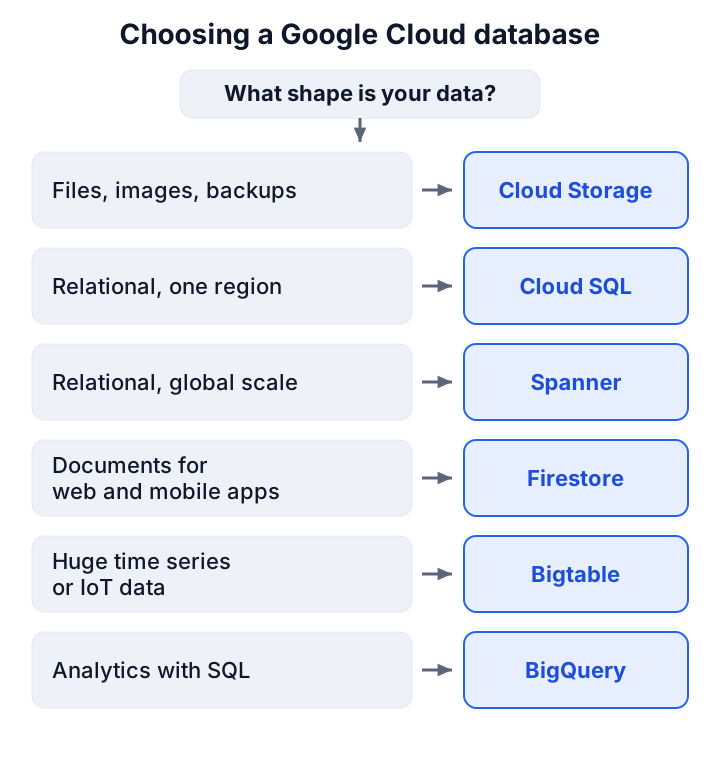
- Cloud SQL: managed MySQL, PostgreSQL and SQL Server for normal business apps in one region.
- AlloyDB: a PostgreSQL-compatible database for heavier PostgreSQL workloads.
- Spanner: a relational database that scales across regions with strong consistency.
- Firestore: a document database for web and mobile apps, with offline sync.
- Bigtable: a wide-column NoSQL store for huge volumes of time series or IoT data.
- Memorystore: a managed in-memory cache for sessions and hot data.
- BigQuery: the analytics warehouse; you meet it properly in stage 8.
Here is how to tell the two relational options apart. A shop in one country with one database is Cloud SQL. A bank with users on three continents writing at the same time, and no room for manual sharding, is Spanner.
Try it
Create a bucket in a free-tier US region, upload a file and add a lifecycle rule. Share the file with a signed URL that expires in 10 minutes and watch it stop working.
For the exam: match the access pattern to the class, as in this practice question on seven-year retention, and the data shape to the database, as in the global relational database question.
Stage 5: Networking
Networking is where most beginners get stuck, because a mistake shows up as silence: the VM is running, but nothing answers. Learn this stage slowly. It pays back in every later stage.
VPC networks and subnets
A Virtual Private Cloud (VPC) is your private network inside Google Cloud. Here Google differs from AWS and Azure in a way the exams love: a VPC network is global, while its subnets (IP ranges) are regional. One network can have a subnet in Iowa and another in Belgium, and VMs in both talk over internal addresses without any extra setup.
Every new project starts with a default network, an auto mode VPC that creates one subnet in each region and adds some firewall rules. That's handy for a lab. For production, create a custom mode VPC, where you choose every subnet and IP range yourself.
Firewalls and private access
Firewall rules decide which traffic may reach your VMs. You aim a rule at VMs by network tag or by service account. If a web server doesn't answer, the first thing to check is whether a rule allows TCP port 80 or 443 from where you're calling.
Production VMs usually have no public IP address. Two features keep them useful:
- Cloud NAT lets private VMs reach the internet for updates, without being reachable from it.
- Private Google Access lets private VMs reach Google APIs, such as Cloud Storage.
To reach those private VMs yourself, use Identity-Aware Proxy (IAP) TCP forwarding, which opens SSH through Google after checking your identity, so no VM needs a public IP.
Connecting networks and users
Two ways connect VPC networks, and they get confused:
- VPC Network Peering: links two networks so they can talk. It is not transitive: if A peers with B and B with C, A still can't reach C.
- Shared VPC: one host project owns the network, and other projects place VMs in its subnets. Use it when a central team must own the network for many teams.
Cloud Load Balancing spreads traffic across backends. The global external Application Load Balancer gives users one IP address and sends each request to the nearest healthy region. Add Cloud CDN to cache content at the edge and Cloud Armor to block attacks and unwanted IPs. Cloud DNS points your domain at all of it. Cloud VPN and Cloud Interconnect link your own data centre to Google Cloud.
Try it
Create a custom mode VPC with one subnet, a VM with no public IP, a firewall rule for IAP and Cloud NAT. SSH in through IAP and run an update. If it works, you've built what most production networks look like.
For the exam: the non-transitive peering question and the Shared VPC host project question cover the two traps people miss most.
Stage 6: Containers and Kubernetes (GKE)
A container packs your app with everything it needs to run, so it behaves the same on a laptop and in the cloud. Once you have dozens of them, you need something to place them on machines, restart them when they crash and scale them with load. That's Kubernetes, and Google's managed version is Google Kubernetes Engine (GKE).
Images and Artifact Registry
First you build an image and store it. Artifact Registry is Google Cloud's private store for container images and other packages. Cloud Run, GKE and Compute Engine all pull images from it.
Standard vs Autopilot
GKE has two modes, and this is the first GKE decision on every exam:
- Standard: you manage the nodes (the VMs that run your containers): their size, their number and their upgrades.
- Autopilot: Google manages the nodes. For general-purpose pods, you pay for the CPU and memory your pods request.
For a team with nobody to look after nodes, Autopilot is the answer, as this practice question on GKE modes shows. The free tier covers the cluster fee for one Autopilot or zonal Standard cluster a month. It doesn't cover the nodes or pods, so this is the stage where a lab can cost real money.
The Kubernetes you need
You don't need all of Kubernetes for ACE. You need a few objects:
- Pod: one or more containers that run together.
- Deployment: keeps a set number of identical pods running and rolls out new versions.
- Service: gives pods a stable address; type LoadBalancer exposes them to the internet.
- Horizontal pod autoscaler: adds pods when CPU climbs; the cluster autoscaler then adds nodes when pods have nowhere to run.
When pods inside GKE call Google APIs, use Workload Identity Federation for GKE, the same keyless idea as stage 2, so no key file sits in a Kubernetes secret.
Try it
Create an Autopilot cluster, deploy a public sample image with a Deployment and a LoadBalancer Service, scale it to three pods, then delete the cluster the same day.
For the exam: know when GKE beats Cloud Run. Choose GKE when you need Kubernetes itself (its APIs, its tooling, many services that talk to each other), and Cloud Run when you just need a container to answer requests.
Stage 7: DevOps, operations and cost
Building something once is easy. Rebuilding it the same way every time, knowing when it breaks and paying a fair price for it is the real job. This stage is the difference between a lab and production.
Automate the build and the infrastructure
Cloud Build runs your build steps on every commit: test, build the image, push it to Artifact Registry. Cloud Deploy then promotes a release from dev to staging to production.
For the infrastructure itself, stop clicking. Infrastructure as code means you describe VMs, networks and databases in files, keep the files in Git and apply them with a tool. Terraform is the common choice, and Infrastructure Manager runs Terraform for you on Google Cloud. A practice question on configuration drift shows why exams prefer it over scripts on laptops.
See what's happening
Google Cloud's observability tools answer three questions:
- Cloud Logging: what happened? Every service writes logs here. Log sinks copy them to BigQuery, Cloud Storage or Pub/Sub, and exclusion filters drop noise you'd otherwise pay for.
- Cloud Monitoring: is it healthy right now? Metrics, dashboards, uptime checks and alerts.
- Cloud Trace: where is the time going? It follows one request across services to find the slow hop.
Cloud Audit Logs record who changed what. Admin Activity logs are always on. Data Access logs, which record reads of your data, are mostly off by default and must be turned on, which makes them a favourite exam trap.
Secret Manager stores passwords and API keys so they never sit in code. Cloud KMS manages encryption keys, including customer-managed keys when a rule says you must own them.
Keep the bill honest
Cost is an operations skill. Put labels such as team=checkout on resources, export billing data to BigQuery and query it to see who spends what. Recommenders suggest idle VMs to delete and oversized VMs to shrink. Delete unused disks, snapshots and static IPs; they cost money while doing nothing.
Try it
Write a Terraform file for one bucket and one VM, apply it, change the VM's machine type in the file and apply again. Add an uptime check on your Cloud Run service from stage 3, and an alert that emails you.
With stages 1-7 done, you've covered the ground of the Associate Cloud Engineer exam. Our guide on whether the Associate Cloud Engineer is worth it explains the exam and its value. When you're ready, check yourself against the ACE practice tests.
Stage 8: Data and analytics
Many teams choose Google Cloud for its data tools, and BigQuery is the main reason. This stage turns you from someone who runs apps into someone who can move and question data at scale.
BigQuery
BigQuery is a serverless data warehouse: you load data and run SQL, and there are no servers to size. Storage and compute are separate layers that scale on their own, so storing a lot of data doesn't force you to pay for idle compute. The free tier includes 1 TiB of queries and 10 GiB of storage a month.
On on-demand pricing you pay for the bytes a query scans, not the rows it returns. That's the classic trap: on an unclustered table, adding LIMIT 10 to a query doesn't cut the bytes scanned. What does cut them is partitioning (splitting a table by date, so a query for one day reads one day) and clustering (sorting data inside partitions by columns you filter on). Before running a big query, a dry run tells you how many bytes it would scan. The partition filter practice question is built on exactly this.
Moving data around
- Pub/Sub: a message service. Publishers send messages to a topic; subscribers receive them, by push or pull. It decouples the app that makes events from the apps that use them.
- Eventarc and Workflows: Eventarc routes events (a new file, a new message) to services; Workflows chains steps into a process.
- Dataflow: runs batch and streaming pipelines written with Apache Beam, such as cleaning click events on their way into BigQuery.
- Dataproc: managed Spark and Hadoop, for teams moving existing jobs without rewriting them.
- Cloud Composer: managed Apache Airflow, for scheduling pipelines that depend on each other.
- Looker and Looker Studio: dashboards and reports on top of the warehouse.
An analogy helps: Pub/Sub is the post office, Dataflow is the sorting line, BigQuery is the archive, and Looker is the report on the manager's desk.
Try it
Query one of BigQuery's public datasets, then run the same query as a dry run with and without a date filter on a partitioned table, and compare the bytes.
For the exam: this stage is the core of the Professional Data Engineer exam and a regular part of the architect exam.
Stage 9: AI and machine learning
AI on Google Cloud comes in three levels of effort, and the trick is to pick the lowest one that does the job.
- Use a ready-made API. The Vision, Speech-to-Text, Natural Language and Translation APIs solve common tasks with a call and no training. Reading text from scanned invoices is a Vision API job, not a custom model.
- Use a foundation model. Gemini models answer questions, summarize and write. You reach them through Google AI Studio for quick prototypes, or through Gemini Enterprise Agent Platform (Google's newer name for Vertex AI, announced in April 2026) for production, with IAM and security controls.
- Build your own model or agent. Agent Platform also covers training, tuning, deployment and agents. BigQuery ML lets analysts train simple models with SQL where the data already lives.
A common modern pattern is retrieval-augmented generation (RAG). Before the model answers, your app finds relevant passages in your own documents and passes them in. The answer is then grounded in your data instead of the model's memory. Google's offerings for this change names often; our map of Google Cloud's generative AI offerings keeps them straight.
Expect costs here. GPUs and TPUs (Google's own AI chips) are never in the free tier, and trial accounts can't attach GPUs at all. Learn the concepts on small API calls first.
Try it
Call the Natural Language API on a paragraph of text from Cloud Shell, then ask a Gemini model the same question with and without a document pasted in, and compare the answers.
For the exam: this stage feeds the Professional Machine Learning Engineer exam and the Generative AI Leader practice tests.
Stage 10: Security, migration and architecture
The final stage stops asking "how does this service work?" and starts asking "what should this company build?" That's the Professional Cloud Architect's question, and it pulls every earlier stage together.
Security at the organization level
- Security Command Center: one place to find misconfigurations, such as a public bucket, and threats across the organization.
- VPC Service Controls: a perimeter around services like BigQuery and Cloud Storage, so data can't be copied out to a project outside it, even by someone with valid credentials.
- Landing zone: the organization, folders, network, IAM groups and policies set up before the first workload arrives. Building it first is far easier than fixing it later.
Migration
Most companies arrive with data and servers already running somewhere else. Storage Transfer Service moves data online from other clouds or your servers into Cloud Storage. Transfer Appliance is a physical device for data too large to send over the network in time. Database Migration Service moves databases into Google Cloud: MySQL into Cloud SQL, and PostgreSQL into Cloud SQL or AlloyDB. VMs usually move as they are first ("lift and shift") and get improved after.
Designing for failure
Architecture is mostly about failure. Ask two questions for every system: how much data can we lose (recovery point objective, RPO), and how long can we be down (recovery time objective, RTO)?
A zonal app survives nothing. A regional MIG or regional Cloud SQL survives a zone outage. Surviving a region outage needs a second region and data copied to it, at a higher cost. Google's Well-Architected Framework groups these choices into pillars such as reliability, security, cost and operations.
Try it
Take your stage 3 app and sketch it for a 99.9% availability target: which pieces go regional, which need a second region, and what each choice adds to the bill. Then check your answer against the architect exam's case studies.
For the exam: the Professional Cloud Architect practice tests are scenario questions where every option works, and you pick the one that fits the business constraint.
Which Google Cloud certification fits which stage?
Certifications are checkpoints on the roadmap, not the roadmap itself. The prices below are from Google's pages in November 2026, plus tax where it applies.
- Cloud Digital Leader (CDL): after stage 1, if you're in a business or non-technical role. $99, 90 minutes, 50-60 questions, valid 3 years, no coding. See our Cloud Digital Leader guide.
- Associate Cloud Engineer (ACE): after stage 7. $125, 2 hours, 50-60 questions, valid 3 years. Google recommends 6+ months of hands-on experience.
- Professional Cloud Architect (PCA): after stage 10. $200, 2 hours, 50-60 questions including 2 case studies that make up 20-30% of the exam, valid 2 years. Google recommends 3+ years of industry experience, including 1+ year on Google Cloud.
- Specialist professional exams: Cloud Developer after stages 3, 6 and 7; Data Engineer after stage 8; Machine Learning Engineer after stage 9.
If money is tight, our page on free cloud certifications lists the voucher routes. For hands-on labs, Google's own learning platform, Google Skills, has guided labs that run in temporary projects.
Common traps across the whole roadmap
A few mistakes catch beginners at every stage, and the exams are built around them:
- Granting Owner or Editor "to make it work". The right answer is almost always a narrower predefined role, granted to a group.
- Creating service account keys. Attach the service account, use impersonation, or use Workload Identity Federation.
- Thinking a budget is a cap. It alerts; it doesn't stop anything.
- Treating a VPC as regional. It's global; subnets are regional.
- Expecting peering to be transitive. It isn't.
- Picking the coldest storage class for cheap storage. Read costs and minimum durations can make it the expensive choice.
- Using `LIMIT` to cut BigQuery cost. Partitions and clusters cut bytes scanned; on an unclustered table,
LIMITdoesn't.
You can test yourself on all of these in the full list of ACE practice questions and the PCA question list.
Full topic index: 84 Google Cloud topics in learning order
This is the whole zero-to-hero path as one numbered list. Each topic is small enough for one focused study session, and each will get its own whiteboard video on our YouTube channel over time.
Stage 1: Cloud and Google Cloud basics
- What cloud computing is (IaaS, PaaS, SaaS, serverless)
- Google Cloud regions, zones and edge locations
- Google Cloud free trial and free tier
- Console, Cloud Shell and the gcloud CLI
- Resource hierarchy: organization, folders, projects
- Billing accounts, budgets and alerts
- Enabling APIs and working with quotas
Stage 2: Identity and access
- IAM explained: principals, roles and policies
- Basic vs predefined vs custom roles
- Service accounts
- Service account keys vs impersonation
- Workload Identity Federation
- Cloud Identity and Google groups
- Organization Policy Service
- IAM Conditions and deny policies
Stage 3: Compute
- Compute Engine VMs and machine families
- Disks: Persistent Disk, Hyperdisk, Local SSD and snapshots
- Images and instance templates
- Managed instance groups: autoscaling, autohealing, rolling updates
- Spot VMs and committed use discounts
- App Engine standard vs flexible
- Cloud Run services
- Cloud Run jobs and worker pools
- Cloud Run functions
- Choosing compute on Google Cloud
Stage 4: Storage and databases
- Cloud Storage buckets and storage classes
- Object versioning, lifecycle rules and retention locks
- Securing buckets: uniform access and signed URLs
- Bucket locations: region vs dual-region vs multi-region
- Filestore
- Cloud SQL
- AlloyDB for PostgreSQL
- Spanner
- Firestore
- Bigtable
- Memorystore
- Choosing a database on Google Cloud
Stage 5: Networking
- VPC networks: global networks, regional subnets
- Firewall rules and hierarchical firewall policies
- Cloud NAT and Private Google Access
- VPC Network Peering vs Shared VPC
- Cloud Load Balancing explained
- Cloud CDN and Cloud Armor
- Cloud DNS
- Hybrid connectivity: Cloud VPN and Cloud Interconnect
- Private Service Connect
- Identity-Aware Proxy and SSH without public IPs
- Network Service Tiers
Stage 6: Containers and Kubernetes
- Containers and Artifact Registry
- GKE Standard vs Autopilot
- Kubernetes basics on GKE: pods, deployments, services
- GKE autoscaling
- Workload Identity Federation for GKE
- GKE upgrades, release channels and rollbacks
Stage 7: DevOps, operations and cost
- Cloud Build
- Cloud Deploy
- Terraform and Infrastructure Manager
- Cloud Logging, log sinks and exclusions
- Cloud Monitoring: metrics, uptime checks and alerts
- Cloud Trace, Profiler and Error Reporting
- Cloud Audit Logs
- Secret Manager and Cloud KMS
- Cost control: labels, billing export and recommenders
Stage 8: Data and analytics
- BigQuery explained
- BigQuery partitioning, clustering and cost control
- Pub/Sub
- Eventarc and Workflows
- Dataflow
- Dataproc
- Cloud Composer
- Looker and Looker Studio
Stage 9: AI and machine learning
- Gemini Enterprise Agent Platform (formerly Vertex AI)
- Gemini models on Google Cloud
- Pre-trained AI APIs: Vision, Speech, Natural Language, Translation
- BigQuery ML
- RAG and agents on Google Cloud
- GPUs and TPUs on Google Cloud
Stage 10: Security, migration and architecture
- Security Command Center
- VPC Service Controls
- Moving data in: Storage Transfer Service, Transfer Appliance and Database Migration Service
- Migrating VMs to Google Cloud
- High availability and disaster recovery on Google Cloud
- Google Cloud Well-Architected Framework
- Landing zones and enterprise foundations
Frequently asked questions
How long does it take to learn Google Cloud?
At 6-8 hours a week, stages 1-7 take most people two to three months, which is enough for the Associate Cloud Engineer exam. The architect level takes longer, because it needs real project experience as well as study.
Can I learn Google Cloud for free?
Mostly, yes. The $300 trial credit lasts 90 days, and the free tier covers a small VM, Cloud Storage, BigQuery queries and Cloud Run requests every month after that. GKE nodes, databases and GPUs are where labs start to cost money, so delete them the same day.
Should I start with Cloud Digital Leader or Associate Cloud Engineer?
If you'll build and run things, go straight to ACE: the roadmap's first seven stages lead there. If your role is in sales, management or finance, Cloud Digital Leader fits better, and our comparison of beginner cloud certifications puts it next to the AWS and Azure equivalents.
Do I need to know coding to learn Google Cloud?
Not to start. Stages 1-5 need only the console, Cloud Shell and a few commands. From stage 6 on, reading YAML, a little Python or SQL, and basic Linux help a lot.
Is Google Cloud harder to learn than AWS?
Not harder, just different. A few ideas work differently, such as global VPC networks and the project-based resource tree, so AWS users should spend extra time on stages 1, 2 and 5.
Which stage matters most for the exams?
Stage 2. IAM and the resource hierarchy appear in many scenarios on most Google Cloud exams, and a wrong grant is the most common wrong answer.